20% off Demo Text

Why Choose Height Adjustable Desks?

A desk can look harmless until the afternoon arrives: shoulders creep upward, knees stiffen, and the same patch of carpet sits beneath your chair for hours. Height Adjustable Desks offer a practical way to change that routine. With a button press or a hand crank, the work surface moves to suit sitting or standing. Small change. Different posture. A monitor can stay at eye level, while feet rest flat and forearms remain near desk height. Those details matter more than a dramatic before-and-after photo.

Cornell University ergonomics professor Alan Hedge is often associated with the reminder, “The best posture is your next posture.” That idea captures the appeal of adjustable desks: movement and variation, not standing all day. Still, a desk is not a cure-all. Standing for too long can feel just as tiring, and poor monitor or keyboard placement can follow you upward. I would not treat the motor as an ergonomic expert. The setup needs attention, and habits take time to change.

This guide explores why Height Adjustable Desks may suit home offices, shared workspaces, and changing daily routines. It will consider comfort, adjustability, space, and practical features such as stability and controls. The right choice depends on the person, the task, and the room. That part is easy to overlook. A useful desk should fit real work—not just look impressive in a product photo.

Why Choose Height Adjustable Desks?

What Height-Adjustable Desks Are

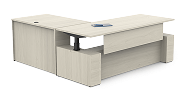
A height-adjustable desk has a work surface that moves between seated and standing positions. A hand crank or electric motor changes its height, letting users set the desk for their body and task. It is not simply a tall desk: the useful feature is the ability to adjust it throughout the day. Some models also store preferred settings, though the basic goal is a comfortable fit.

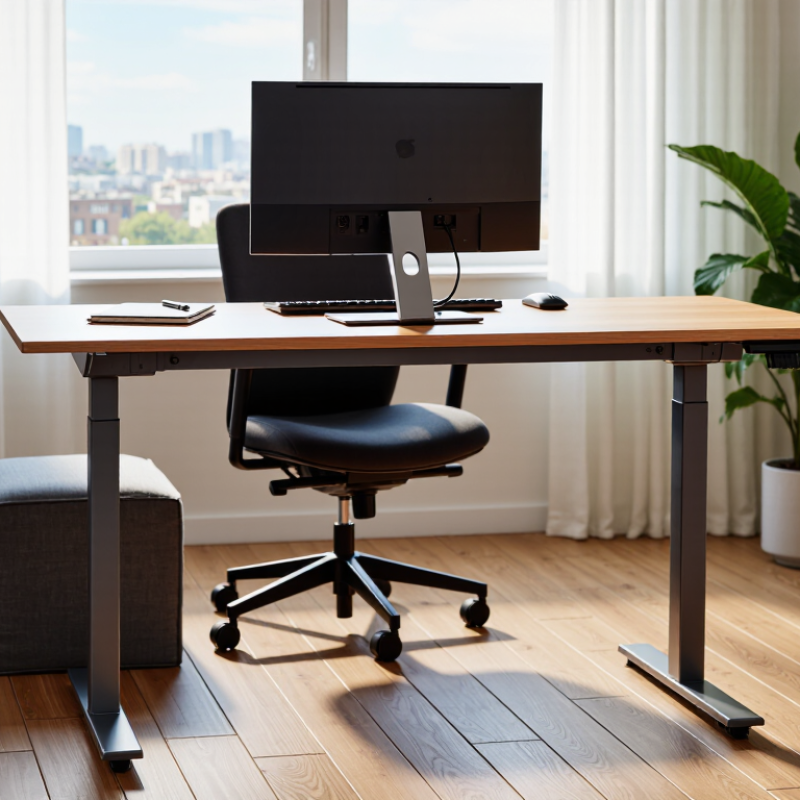
At a seated height, your feet should rest on the floor, with elbows near desk level. When standing, the keyboard should remain close to elbow height, and the monitor should sit directly ahead. Small adjustments matter. A desk that rises but leaves the screen too low may replace one awkward posture with another. The US Occupational Safety and Health Administration’s computer workstation guidance recommends arranging screens and input devices to support neutral, comfortable postures.

A 2018 Cochrane review of workplace interventions found that sit-stand desks reduced workplace sitting by about 100 minutes per workday in the short term; the authors rated the evidence as low quality. That is useful context, not a promise for every user. Standing all day is not the point. Changing position is. And honestly, people may still forget to adjust the desk when work gets busy.

How Height-Adjustment Mechanisms Work

Why Choose Height Adjustable Desks?

How Height-Adjustment Mechanisms Work

A height-adjustable desk moves through a frame built to support its top at different levels. The mechanism beneath determines how that movement feels. With a manual crank, turning a handle rotates gears that extend or retract the legs. It takes effort, but the motion is easy to understand and does not rely on a power outlet. Some crank systems move slowly, especially when the desk carries a monitor, books, and other equipment.

Electric desks use motors, often housed inside the lifting columns, to raise or lower the frame. Pressing a control sends power to the motors, which drive internal screws or similar components. Dual-motor designs can help the legs travel together, though setup and frame quality still matter. A desk that rises unevenly may wobble or strain its mechanism. That is why checking the stated load capacity and assembling the frame carefully are practical steps, not minor details.

Some desks use gas springs or counterbalance systems to assist movement. These can feel smooth, but they may require the user to lift or press against the desktop. Small differences matter. A control panel with saved height settings can make changes quicker, while a quiet motor may be less distracting in a shared room. Yet no mechanism is perfect: motors can sound louder under heavy loads, and manual adjustment can become tedious. The best fit depends on how often the desk moves and what it needs to carry.

Ergonomic Benefits of Alternating Between Sitting and Standing

Why Choose Height Adjustable Desks?

Ergonomic Benefits of Alternating Between Sitting and Standing

A height-adjustable desk makes it easier to change posture during the workday. Standing can interrupt long stretches of sitting, while sitting offers a chance to rest your legs. The goal is movement, not standing all day.

Set the desk so your elbows stay near your sides and your forearms sit roughly level with the keyboard. When standing, keep your screen near eye level and your feet comfortably planted. A small footrest or a brief walk can help if your legs feel tired. Pay attention to your body.

Changing positions may ease discomfort linked to staying in one posture for too long, but it is not a cure for back or neck pain. Start with short standing intervals, such as ten or fifteen minutes, then adjust based on comfort. Some days, meetings or deadlines will disrupt the plan. That happens. A timer may help, though it can become another notification to ignore. What matters is finding a steady rhythm that feels sustainable, with regular movement and a setup suited to your body.

Common Uses in Home and Office Workspaces

At home, a height adjustable desk can shift between focused screen work and standing tasks like reviewing printed plans. It also helps when a workspace doubles as a dining area: lower the surface for a chair, then raise it to clear nearby drawers or storage. Small changes matter. Keep the monitor near eye level and the keyboard close, so standing does not simply replace one awkward posture with another. A desk cannot fix poor setup by itself.

In shared offices, adjustable desks suit hot-desking, where people of different heights use the same station. They can also support brief standing check-ins without moving to a conference room. A 2018 Cochrane review found sit-stand desks reduced workplace sitting by about 100 minutes per workday in the short term. The review noted that the evidence was limited, so this is not a guaranteed result. Standing all day is not the goal. Alternate positions, take short walking breaks, and adjust the desk to fit the task. In practice, people may forget to change positions when deadlines pile up. That part takes habit, not hardware.

Key Factors to Consider When Choosing a Desk

Why Choose Height Adjustable Desks?

Key Factors to Consider When Choosing a Desk

Choosing a height adjustable desk starts with fit, not features. At sitting height, your feet should rest flat, with elbows near desk level and shoulders relaxed. When standing, the screen should sit close to eye level, so you are not bending your neck toward it. Measure your chair, monitor, and available floor space before comparing desk dimensions. Small details matter.

Check the adjustment range against the people who will use the desk. A desk that rises smoothly but cannot reach a comfortable seated height is not very adjustable in practice. Stability matters, too: a gently wobbling screen can become irritating during typing. In a 2018 Cochrane review, sit-stand desks reduced workplace sitting by about 100 minutes per day in the short term; the evidence was rated low quality. That is useful context, not a promise for every office.

Consider lifting capacity, noise, controls, and cable access. Test the desk with your actual monitor and equipment, if possible. In the 2018 BMJ SMArT Work trial, a broader workplace intervention reduced daily sitting by 22 minutes at 12 months. The desk was only one part of that intervention. And changing positions takes practice. Many people forget. A simple timer may help, though alarms can become annoying.